
Operation Manual for Kugoo Electric Scooters
Table of Contents Safety Precautions for Riding Operating Methods Disc Brake Operation Rules and Precautions Charger and Battery Safety Precautions Main Components of the Electric Scooter. Inspection and Maintenance

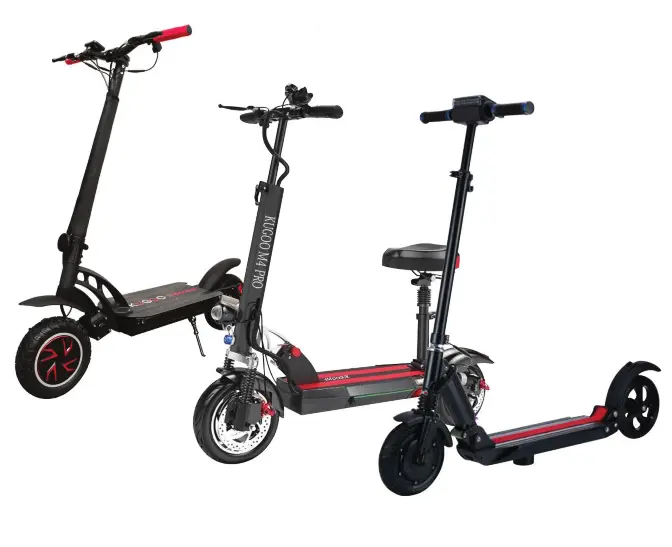





Complete Safety and Operation Manual for Kugoo Electric Scooters
Table of Contents
- Safety Precautions for Riding
- Operating Methods
- Disc Brake Operation Rules and Precautions
- Charger and Battery Safety Precautions
- Main Components of the Electric Scooter. Inspection and Maintenance
- Structure of the Kugoo S3 and Kugoo S3 Pro + Technical Specifications
- Control Display of Kugoo S3 and Kugoo S3 Pro
- Structure and Technical Specifications of Kugoo M2
- Structure of the Kugoo M3 Pro Electric Scooter
- Structure of Kugoo M4, Kugoo M4 Pro and Kugoo Max Speed
- Display of Kugoo M2, M3, M3 Pro, M4, M4 Pro and Kugoo Max Speed
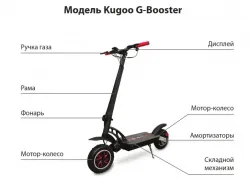
- Structure of the Kugoo G-Booster Electric Scooter
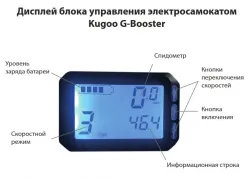
- Control Display of Kugoo G-Booster
1. Safety Precautions for Riding
Please follow traffic regulations to ensure safe riding. Control your speed within a safe range (note that a safe speed should not exceed 30 km/h).
Before starting to ride, read the user manual and then find a safe place to practice. Make sure you fully understand the riding technique and familiarize yourself with the design and technical specifications — this is the basis of safe riding.
Do not allow anyone to ride the electric scooter unless they have received full instruction and studied this manual.
Prohibited:
- Riding with one hand
- Riding without holding the handlebar
- Riding while intoxicated
Pay special attention during rainy and snowy weather. Rain and snow may cause slipping while braking on wet surfaces.
Therefore:
- Do not ride at high speed in such conditions
- Turn carefully
Remember: start braking earlier on wet surfaces to avoid accidents.
The electric scooter must only be used while wearing a helmet.
Proper helmet use:
Put the helmet on your head and fasten the strap before starting to ride.
Proper clothing:
Do not wear tight clothing while riding. Make sure your body can move freely.
Recommended:
- Clothing with closed cuffs
- Shoes with low heels
Do not overload the scooter. The recommended maximum load is 100–120 kg depending on the model.
If the load is too high, the handlebar may vibrate strongly, which is dangerous.
Normal load: up to 120 kg.
2. Operating Methods
Riding
Maintain a relaxed posture and proper body position.
When riding while standing, increase speed smoothly to prevent shifting the center of gravity due to sudden acceleration.
Reduce speed on rough roads or gravel surfaces.
In rainy or snowy weather the road surface becomes wet, which may cause slipping during braking. Pay special attention to this.
It is recommended to avoid riding if the surface has many deep puddles. Water may enter the battery compartment and cause a short circuit or fire.
Moisture may cause incorrect battery operation. Damage caused by moisture is not covered by warranty.
Parking
When parking, pay attention to vehicles and pedestrians around you.
Slowly park the scooter on a flat surface. After secure parking, turn off the power using the control unit button.
Battery Charge Indicator
Turn on the control unit button and the charge indicator will appear.
When the battery is fully charged, all bars of the indicator will be lit.
Recommendation: connect the charger when only one indicator bar remains, and do not allow the battery to fully discharge.
Throttle Lever (Speed Control)
The scooter accelerates when the throttle trigger is pressed toward the rider.
When the throttle is released, braking begins.
After power is cut off, the motor stops.
3. Disc Brake Operation Rules and Precautions
Gap Adjustment
Turn the adjustment screw (located between the brake lever and the handlebar frame) using a 2 mm hex key.
Adjust the gap between the brake pad and the disc until comfortable braking is achieved.
Brake Pad Replacement
After 6 months of use, or if wear exceeds 1 mm (or the screw can no longer adjust), the brake pads must be replaced.
When replacing:
- Press one pad using a Phillips screwdriver to create space.
- Install the new pad.
- After replacement, adjust the screw so the lever is in a comfortable position.
Warnings
- Do not lubricate brake pads or calipers with engine oil.
- Do not touch the brake disc or pads with your hands. This significantly reduces braking efficiency.
- Prevent moisture from getting onto new brake pads.
- Avoid sudden wheel locking, which may cause injury due to uncontrolled skidding.
4. Charger and Battery Safety Precautions
Operation
During charging:
- First connect the plug to the battery unit.
- Then connect it to the 220 V power outlet.
After charging:
- First unplug the charger from the 220 V outlet.
- Then disconnect the connector from the battery.
During normal charging the indicator glows red.
When charging is complete it turns green.
If the temperature is too high, the indicator flashes red (overheat protection mode).
Move the device to a cool ventilated place. Charging will resume once the temperature drops to 60 °C.
Charger Warnings
- Use indoors only.
- Do not use in isolated spaces with high temperatures.
- Do not connect the charger without load for long periods.
- If the indicator flashes, there is an unpleasant smell, or overheating occurs — stop charging immediately and take the device to a service center.
- Do not replace the charger without approval from a service center.
- Do not charge batteries that are not rechargeable.
- Do not use near water or in humid rooms (risk of short circuit and fire).
- Do not use in explosive gas environments.
- If the battery case is damaged in an accident, do not touch it (risk of electric shock).
Charging
Use only the recommended charger.
After full discharge:
- 95% charge: 4–5 hours
- Full charge: 5–6 hours
During storage for one month the battery may lose about 35% of its charge. Recharge before use.
Charge the battery in time to ensure maximum range.
During charging do not allow the positive and negative terminals to contact metal parts.
When delivered, the battery charge is 35–80%.
A new scooter must be charged 3–4 hours before first use.
The charger surface may heat up (normal temperature up to 60 °C).
Store the charger and scooter in a dry place away from explosive materials. Keep children away during charging.
After full discharge the battery must be charged within 24 hours (minimum 3 hours).
Battery Discharge
Improper use voids the warranty.
In case of a short circuit, the system automatically switches to protection mode and the fuse is triggered.
After replacing the fuse, the battery will be ready for operation after 2 minutes.
If current consumption is exceeded (horn, lighting, etc.), the battery may temporarily disconnect but power will be restored after 10 seconds.
Operating temperature: −10 °C to +55 °C.
At extreme temperatures energy capacity decreases (this is normal).
The charging connector must not be short-circuited.
Storage
If stored longer than 1 month, recharge the battery to 60–80% every two months.
Store in a cool dry place.
Do not connect positive and negative terminals together.
Do not use near open flames.
Do not disassemble or modify the battery.
Warning
If the battery housing is deformed or overheated, do not use it. Contact a service center.
If the battery catches fire, do not pour water. Use a powder or foam fire extinguisher only.
Warranty does not cover batteries that were not charged on time.
A battery cannot stop functioning “randomly”.
5. Main Components of the Electric Scooter. Inspection and Maintenance
Inspection, Cleaning and Maintenance
- Check that all parts are present (as after the previous use).
- Check the brakes — they must function properly.
- Check the tires for punctures or cuts.
- Minimum pressure: 2/3 of volume, normal pressure 2.0 atm.
- Check the battery indicator (should show full charge).
- Check all bolts before riding and tighten if necessary.
- Do not wash under a shower or pressure washer. Wipe with a damp cloth or sponge.
- Every 6 months lubricate folding mechanism guides and shock absorbers with silicone lubricant.
Main Components
Lithium Battery
Tested according to UL and CE standards.
Service life is three times longer than lead-acid batteries.
Avoid full discharge.
Weight is three times lower. Provides high voltage, high power, and fast acceleration. Environmentally friendly.
Battery Compartment
In all Kugoo models the battery is located in the platform.
The battery is non-removable and must be replaced only at a service center.
Motor Wheel
Made of high-silicon steel with a thick coil, high-precision bearing, and large armature — providing high power and durability.
Disc Brake
Compact disc brakes with aluminum alloy caliper ensure reliable and comfortable braking.
Handlebar
Ergonomic streamlined metal design for comfortable control.
Handlebar Grips
Soft high-pressure rubber for a comfortable grip.
Seat Cushion
Modern plastic with foam and anti-slip leather provides comfort even on long rides.
Charger
Fully automatic portable charger. Automatically shuts off after charging. Operates from 220 V.
Information line switches with the MODE button.
6. Kugoo S3 and Kugoo S3 Pro Structure + Technical Specifications
Main parameters
Dimensions: 1030 × 450 × 940–1150 mm
Wheelbase: 820 mm
Weight: 12 kg
Tire size: 8" (200 mm)
Maximum load: 120 kg
Maximum speed: 30 km/h
Range: up to 30 km
Maximum torque: 35 Nm
Maximum climbing angle: 20°
Braking (at 20 km/h):
- Dry surface — 1 m
- Wet surface — 3 m
Battery:
- Lithium
- Capacity 8.8 Ah
- Voltage 36 V
Motor:
- Brushless direct drive
- Power 350 W
Charger:
- Input 160–240 V, 50/60 Hz
- Output 42 ± 0.4 V
Charging time: 3–4 hours
Specifications may change without notice.
7. Kugoo S3 and Kugoo S3 Pro Control Display
Controls include:
- Throttle lever
- Electronic regenerative brake lever
- Horn button
- Settings button
- Power button
- Light button
- LCD display
- Power mode button
Display shows:
- Battery level
- Speed
- Voltage
- Mode
- Information line
Speed mode changes with a short press of the power button.
Power on/off — hold the power button.
Cruise control — activate by holding the throttle. Deactivate by pressing throttle or brake again.
8. Kugoo M2 Structure and Specifications
Dimensions: 1030 × 540 × 1000–1230 mm
Wheelbase: 820 mm
Weight: 16 kg
Tires: 8" (200 mm)
Load: 120 kg
Speed: 35 km/h
Range: 30 km
Torque: 35 Nm
Climb: 20°
Braking:
- Dry — 1 m
- Wet — 3 m
Battery: 10 Ah lithium, 36 V
Motor: 350 W
Charging time: 4–5 hours
9. Kugoo M3 Pro Structure
Dimensions: 1180 × 550 × 1000–1230 mm
Wheelbase: 820 mm
Weight: 19 kg
Tires: 10" (250 mm)
Load: 120 kg
Speed: 35 km/h
Range: 35 km
Torque: 35 Nm
Climb: 20°
Battery: 10.4 Ah lithium, 48 V
Motor: 500 W
Charging time: 4–5 hours
10. Kugoo M4, Kugoo M4 Pro and Kugoo Max Speed
| Parameter | M4 | M4 Pro | Max Speed |
| Dimensions | 1190×610×1190 mm | 1190×610×1190 mm | 1190×610×1190 mm |
| Wheelbase | 850 mm | 850 mm | 850 mm |
| Weight | 23 kg | 24 / 26 kg | 24 kg |
| Tires | 10" | 10" | 10" |
| Load | up to 120 kg | up to 120 kg | up to 120 kg |
| Speed | 35 km/h | 35 km/h | 35 km/h |
| Range | up to 35 km | up to 40–50 km | up to 40 km |
| Torque | 35 Nm | 35 Nm | 35 Nm |
| Climb | 20° | 20° | 20° |
| Battery | 11 Ah | 13 / 16 Ah | 13 Ah |
| Voltage | 48 V | 48 V | 48 V |
| Motor | 500 W | 500 W | 500 W |
| Charging | 5–6 hours | 5–6 hours | 5–6 hours |
11. Display for Kugoo M2, M3, M3 Pro, M4, M4 Pro and Max Speed
Gear parameter — current speed mode:
1 — up to 10–15 km/h
2 — up to 25 km/h
3 — maximum speed
Speedometer — current speed
ODO — total mileage
Buttons:
- Power button (hold several seconds)
- MODE button (switch modes)
- Throttle lever (speed control)
12. Kugoo G-Booster Structure
Dimensions: 1190 × 610 × 1190 mm
Wheelbase: 950 mm
Weight: 25 kg
Tires: 10" (250 mm)
Load: 150 kg
Maximum speed: 60 km/h
Range: 70 km
Torque: 35 Nm
Climb: 25°
Braking:
- Dry — 1 m
- Wet — 3 m
Battery: 23 Ah lithium, 48 V
Motor: 2400 W
Charging time: 6–8 hours
13. Kugoo G-Booster Control Display
Display shows:
- Battery level
- Speed
- Mode
- Information line
Speed mode is changed with a short press of the upper or lower button.
Important: the headlight is turned on using the button located on the rear right side of the platform.
Cruise control activates automatically when the throttle is held for a long time.
Deactivate by pressing the throttle or brake again.
Information line (switch using the center button):
TM — trip time
ODO — total mileage
TRIP — current trip distance
Power on/off the scooter by holding the center button.
